Showing posts with label Cloud backup. Show all posts

Wednesday, March 15, 2017

How Cloud Computing Services are Benefiting in your Business

In the world of Information Technology, it seems that every year a new technology comes to hit the marketplace. A few years ago a technology bombard in the IT industries that can help organizations to take the burden of acquisition of software, servers, and people that are needed to spruce up enterprise services, shared technology solutions, and deployment of customized solutions. This technique is known as Cloud Computing.

Cloud Computing Services has developed extremely well beyond the hype and now is entering the maturity phase. Escalation of Cloud Computing makes it particularly alluring for enterprises to find a service that fits their requirements: which is a challenge in itself. Generally, numerous organizations try to find the right fit, especially in the cloud storage services segment that is comprised of a variety of IT giants and newbie alike. 

Cloud Services has achieved momentous popularity over the past years and it’s all because of its flexibility, affordability, and self-service capacity. It can also handle numerous cloud computing platforms such as cloud, cloud server hosting, and cloud migration. These terms have been thrown so much and most of the people do not know exactly what it means.

Before moving further, let’s discuss something about cloud computing. So the very first question that comes to everybody’s mind is cloud computing.

Cloud Computing is extremely famous as it gives a perfect way to maintain enterprise’s data, websites, and applications. It uses virtual servers to store and maintain data which makes it easy for users to access it when they need it. In other words, cloud computing is a form of computing that to manage your all applications, information and resources in a virtual environment. It delivers shared computing software, data or resources through the web that is one of the most common ways of accessing the cloud.
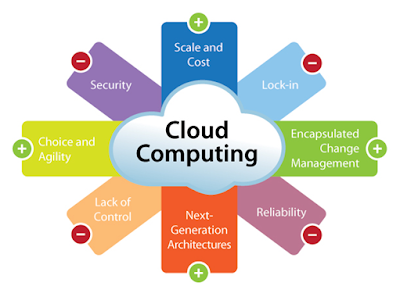


However, there are a number of services are provided by a cloud computing company, but three models are generally used at large. Here are they:

Infrastructure as a Service (IAAS): This model of cloud computing platform provides the basic infrastructural needs like virtual machines, server, and storage house. With the help of IAAS, you can run any workload in the cloud for instant value and productivity of your business.

Software as a Service (SAAS): This cloud computing model eliminates the need to install full-fledged software and use it directly by accessing it through the clouds. SaaS is often referred as Software-on-demand and using it is akin to renting software rather than buying it. SAAS is generally referred to as those services through which users can access the internet related sites such as Google, Twitter, Facebook, and Flicker.

Platform as a Service (PAAS): This model provides the required operating system, programming language execution environment, database and the web server. With the help of Platform as a Service allows a clientele to use the associated servers and virtualized server, so they can easily access the existing apps. They can even design, develop, test or deploy the applications.

Cloud computing has the potential to change the way organizations view and deal with IT needs. So, it is vital to include cloud computing for your current and future needs. 

Monday, February 27, 2017

Compose a Better Recovery Plan from Cloud Disaster Recovery Service

Backup and disaster recovery management is of absolute importance to keep a business running smooth. When you host your data with Wintellisys’ cloud based server, you have immediately increased your disaster protection as our servers offer enhanced security.         
    
Your recovery time that is commonly known as downtime is the amount of time your systems are offline when a disaster occurs. Your job as an IT professional is to ensure maximum business continuity, so you want to make every possible effort to minimize recovery time. Having the right server disaster recovery tools on hand during a disaster is critical. If you want to truly minimize your recovery time, then Cloud Disaster Recovery is perfect for you.

When you hear the word “disaster” in terms of your systems, you may think about things like a hardware failure or a system crash. These and other disasters can absolutely cause a full system break, and other catastrophes that can affect your system on this large scale include natural disaster such as flooding and fires, viruses, theft and more. There are other smaller scale disasters that can occur too, and this may include the intentional or even accidental deletion of a single file or folder. All of these things could cause data loss as well as downtime to your organization, so you need to have a speedy server disaster system in place. It is better to consider Cloud Backup Recovery System.


Cloud disaster recovery services are a good option to ensure that a business continues to function and run even when faced with an unpredicted IT disaster. Keeping your information and data backed up on a cloud server can guarantee a quick recovery. When using a cloud disaster recovery service, your business data will be stored and protected on a server that is surrounded by suppression systems and backed-up power. To protect your critical data, a small portion of the IT budget of the company has to be allocated for the Disaster Recovery management to avoid greater losses. Backup disaster recovery solutions take a short time to get the organization back to its original environment by using the backup.

Depending on the type of security required, the right Managed IT services provider has to be chosen.  There are several organizations which work on a range of modes resulting in the variety of IT demands. There are a number of questions that have to be clarified while selecting a professional. IT Managed Services provides better efficiency and ensure smooth running of the organization. It can also ensure to protect your sensitive data with the Azure Backup service.


Cloud Backup service is very effective in business growth, it helps to ease of use, scalability, and affordable pricing model has made the IT world adapt their disaster recovery options rapidly. If you also want to secure your crucial documents, having a disaster recovery plan is the best bet. Wintellisys ensure you to provide the best cloud backup, recovery strategy that involves the maintaining copies of electronic records in a cloud computing environment as a security measure.  

Sunday, January 8, 2017

Recovered Data from Unwanted Threats with Cloud Backup Recovery Service

In this extraordinary smart world, the cloud is considered as more than just another IT service. Impelling the cloud infrastructure is about embracing an advanced technological lifestyle for many enterprises.

Cloud backup as the name implies, a kind of backup plan which is used to store data, apps, contacts, and other important information in the cloud. In the cyber world this process is also known as online backup, this cloud disaster recovery service being usually provided by the 3rd party service providers. As per the recent survey, almost 66% (two-third) of businesses are considering using the cloud backup, recovery service to protect their imperative information, according to the new industry research.

The data recovery is almost like the undo process. We opt for an undo process when we desire to get back a lost or a missing or a deleted data. Losing data could happen due to numerous causes. The reason varies from a failure of a hard drive, accidental deleting of the files or any attacks from virus. This issue of data loss is a very common and frequent issue. Well, to speak of the better part, there exists a solution regarding recovery. We all know that the solution is quite vital when you want to recover the deleted files or some deleted e-mails.

Most of the people who lose their data accidentally utilize third party recovery software. Anything can be retrieved starting from images, word documents, files, folders, video clips or music files and e-mails which went missing because of unforeseen circumstances. This is the one of the best substitutes for the people who has misplaced their files. They can attempt to do this i.e. gets hold of a recovery software before taking a help from a technician.

There are plenty of companies out there, who is offering cloud backup recovery software to protect and secure your data. This software had the ability to run more than two hundred types of the files. As a computer user, you will be agreed that the process of losing the data is very easy and the process of recovering the data is much complicated. The cloud backup recovery software can work well with any type of Microsoft Windows like it in the Win XP, Win 98, etc. With the arrival of new technology, the process of data recovery has become much easier than ever.

There are a number of recovery software available in the market as well as on the internet which will enable you to recover the data within the fraction of minutes. The first step is to judge the reliability of the data recovery software is to check its compactness. If it is compact enough and has the ability to compatible with the other software then you can trust its reliability and surely it is going to deliver high performance at the time of scanning process. 


If you are really interested in recovering the software efficiently, then it is necessary that you install the best software for the data backup recovery of lost data from the system. One thing which you should be careful about is that you should never let the files to be overwritten because then there will be no hope left of recovering the data back to the system even with the use of the data recovery software. You can also gain the other vital information about the download, use and the installation of the software from some other websites. But, make sure that you have selected the best one for restoring the data back to the system.

Sunday, November 27, 2016

Azure Site Recovery - A Game Changer for Disaster Recovery


Cloud computing and hosting has revolutionized the way in which businesses (small and large) conduct their operations. While the cloud environment allows users to easily scale their websites, there are additional concerns with disaster recovery. Since this type of hosting service is drastically different from the traditional shared or dedicated hosting options, there must be more diverse ways to protect vital data. 

Data Replication 

Data Replication is a concept that everyone in the IT industry should be well versed in. It happens when data is duplicated from one system to another. Essentially, any changes to the current data on a server are automatically replicated on another machine or portion of the cloud. While this might result in the loss of some data in case of any immediate failure, most of the data will remain in the place. Depending on the replication system being utilized, a server might replicate to multiple physical locations. In the event of a failure at one replicated location, another could be used to restore services, in the event of a disaster. 

Managed Service Provider
When consistency and data is important, many businesses will essentially outsource their disaster recovery to their managed service provider. Many hosting services will offer a well planned level of services, but this comes with an additional cost. When this type of disaster recovery plan is being employed, it is essential to have a reliable Service Level Agreement (SLA). It ensures that an appropriate level measure of service is offered to maintain a good quality of service.

Azure Site Recovery and Backup
Many websites will have Azure site recovery or backup plan. This allows for an easy recovery or backup option, you can store your data directly to the cloud and can easily access from wherever you want. While backing up data is relatively cost effective in this instance, restoring it can be very time consuming. Depending on the amount of data, the depending process can take minutes or hours.
These are some of the ways to protect your crucial data, but have you ever thought, why including a disaster recovery is must for your business? Well, we have the answer to your all questions.

Why do you need disaster recovery?
  •          Disaster Recovery is extremely scalable and agile
  •       It involves lower energy consumption
  •          For improved data protection, disaster recovery is must
  •          It reduces the total ownership cost
  •          Anyone can implement disaster recovery very easily in his/her business

Hosting a server on the cloud has many benefits. The ease of use, scalability, and affordable pricing model has made the IT world adapt their disaster recovery options rapidly. If you also want to secure your crucial documents, having a cloud disaster recovery plan is the best bet. Wintellisys ensure you to provide the best cloud backup, recovery strategy that involves the maintaining copies of electronic records in a cloud computing environment as a security measure. 

Friday, July 1, 2016

Cloud Backup: An Efficient Way to Protect Your Data

If you are a business professional, I know how important is for you to protect your company data, financial records, and administrative materials safe. So what is the best way of backing up company computer systems to avoid opening the door to liabilities and huge losses in revenue and reputation? Cloud backup is the latest technology, which I think most of the small or big enterprises using today. 

There are lots of benefits associated with Cloud Backup but, before we go further I would like to highlight little more about the topic cloud backup to ensure you that all your business files are fully protected. Here we go...
                     

“Cloud Backup or Azure Backup is a strategy for backing up data to a remote and cloud based server. If you do not have a good backup system, you are at the mercy of chance. Data can be wiped out easily as soon as a hard drive fails, and it may not be possible to retrieve it. That is why number of organizations are using this technology”.

However, protecting your company’s important document plays a critical role in business growth. But, what if you have a heap of a backup file that creates blunder while you search for a specific one? Don’t worry I also have a solution for it Data Consolidation: A process that summarize large quantities of information into a single destination.  This technique will surely improve your search. Without wasting any time, let’s comes back to our topic, here, I am going to discuss some of the benefits associated with the azure backup.                                           
Affordable:

Small businesses don’t have boundless IT budgets. So, it’s critical to utilize a solution that makes sense and won’t require your client to bring about a capital expenditure. For as low as a couple of hundred dollars per year, your clients can have all of their data backed up to the cloud.


Accessibility:


If your organization cannot afford the investment and maintenance the disaster recovery infrastructure, cloud backup will surely allure you. It is important to keep a copy of files off-site. However, you already made backup of your business files, but any severe natural disaster such Hurricane, Flood or earthquake could destroy the computer and even the backups. 

Simple:


Cloud backup solutions have made ongoing administration and restoration easy. You can easily get your backed up files found or restored, with just a few clicks of the mouse.

Automatic:


One of the most common reasons why organizations are not backing up their data is ‘Time’. Cloud backup does not require an extra time for you or your customer. Today, all your files are backed up automatically to the cloud whenever you are connected to the Internet. 


The cloud has changed the backup data industry. This is the best technology I have ever seen that not only provides an affordable price point, but also create a backup of your files automatically. So attain this simple solution and access your data from anywhere and anytime.